
Buran Mobile App
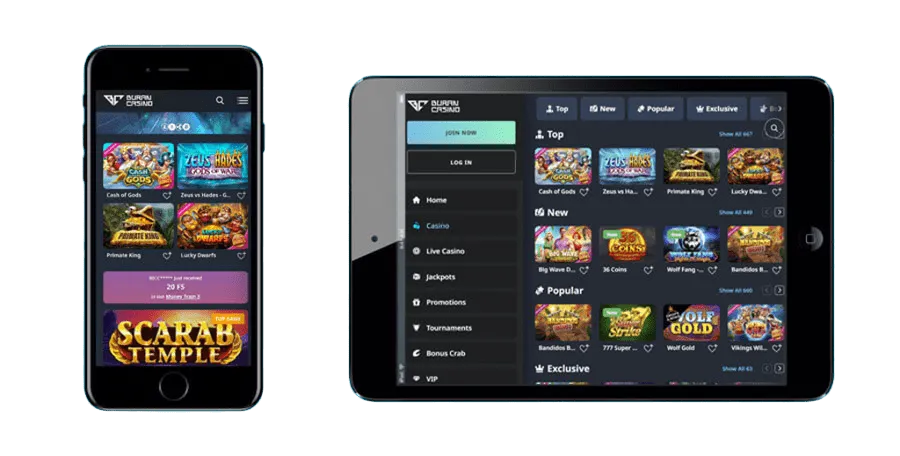

At Buran, we've built our mobile experience around speed, simplicity, and seamless access to everything our players love. Whether you're commuting, relaxing at home, or just prefer gaming on the go, the Buran app brings our full casino floor straight to your phone or tablet. Here at Buran Casino, we believe mobile gaming should feel just as polished as the desktop version, and that's exactly what we've delivered.
In this guide, we'll walk you through everything about our mobile platform - from installation to features, bonuses, and account management. Let's get started.
Why Our App Stands Out
We've focused on a handful of features that make mobile gaming at Buran Casino genuinely enjoyable:
- Instant loading times, even on 4G connections
- No storage space used, since there's nothing to download from an app store
- Automatic updates pushed directly through the browser
- Full access to live chat support from within the app
- Identical game library to our desktop version, with no missing titles
Our team at Buran Casino continuously tests the app across different devices and screen sizes to ensure compatibility. Whether you're using the latest smartphone or an older model, the interface adapts smoothly without lag or visual glitches.
Security on Mobile
We take security seriously, regardless of which device you use. Our mobile platform uses the same encryption standards as our desktop site, protecting your personal information and transaction data. We operate under a license from the Anjouan Gaming Board, and our KYC verification process - typically completed within 24-48 hours - applies equally to mobile users.
How to Get the Buran App
We offer a browser-based mobile app that works smoothly on both Android and iOS devices, without requiring a download from an official app store. This approach lets our team push updates instantly and keeps your device free of unnecessary storage clutter.
For Android Users
- Open your mobile browser and visit the official Buran Casino website
- Tap the menu icon and select the option to add the site to your home screen
- Confirm the installation - an icon will appear on your device
- Launch the app directly from your home screen, just like a native application
For iOS Users
- Open Safari and navigate to our official site
- Tap the "Share" icon at the bottom of the screen
- Select "Add to Home Screen"
- Name the shortcut and confirm - your Buran icon is ready to use
Our Buran app installation process takes less than a minute, and once it's set up, you won't need to repeat these steps again. We at Buran Casino made sure the whole process stays lightweight, so it won't slow down your phone's performance.
Logging In and Managing Your Account
Once you've installed the app, signing in is quick. Simply enter your username and password, or use your saved credentials if you've enabled that option. If you're new here, you'll need to register first via Buran Casino sign up, after which your login works identically across desktop and mobile. We keep your session secure with encrypted login protocols, so you can switch between devices without worrying about your data.
From your account dashboard, you can manage deposits, review your transaction history, check your VIP status, and update your personal details - all optimized for smaller screens without losing any functionality.
Game Selection on Mobile
We've optimized thousands of titles for smaller screens without compromising on graphics or load times. Our mobile library includes:
- Over 12,000 slots from providers like Pragmatic Play, NetEnt, and Hacksaw Gaming
- 900+ live dealer tables, including roulette, blackjack, and baccarat
- Megaways titles, bonus buy features, and progressive jackpots
- Arcade games such as Plinko, Mines, Dice, and Keno
At Buran Casino, we stream our live casino games smoothly even on moderate connection speeds, so you can enjoy a dealer-hosted blackjack table from your phone just as easily as from a desktop computer. Our live casino section runs through providers like Evolution, Pragmatic Play Live, and Ezugi, giving you authentic, real-time gameplay wherever you are.
Deposits and Withdrawals via Mobile
Managing your funds through our app is just as straightforward as on desktop. You can deposit using Visa, Mastercard, Skrill, Neteller, Trustly, or cryptocurrencies like Bitcoin and Ethereum. Withdrawals follow the same VIP-based limits as our full site, and we process most e-wallet and crypto withdrawals within 0-24 hours.
| VIP Level | Daily Withdrawal | Monthly Withdrawal |
|---|---|---|
| Cadet | A$800 | A$10,500 |
| Lieutenant | A$800 | A$16,000 |
| Commander | A$1,200 | A$20,000 |
| Captain | A$1,600 | A$24,000 |
| Marshal | A$2,500 | A$35,000 |
Our Buran withdrawal process stays consistent across devices, so there's no need to switch to a desktop computer just to cash out your winnings.
Claim Free Spins and Bonuses on the Go
One of the best parts of playing through our mobile platform is that you never miss out on promotions. Our free spins offers, reload bonuses, and cashback programs are all fully accessible from the app. You can opt into weekly promotions, track wagering progress, and claim rewards with just a few taps.
| Bonus | Details |
|---|---|
| Welcome Bonus | 100% up to A$750 + 200 Free Spins (first deposit) |
| Weekly Reload | 50 Free Spins, Monday-Thursday deposits from A$30 |
| Weekend Reload | 50% up to A$1,050 + 50 Free Spins |
| Sunday Spins | Up to 100 Free Spins on Detective Fortune |
Our Buran Casino bonus is activated from the "My Bonus" section, and the same rules apply whether you're using desktop or mobile - wagering requirements, max bet limits, and cashout caps remain consistent, so there's no confusion switching between platforms.
Customer Support While Using the App
We offer multiple ways to reach our support team directly from your mobile device:
- Live Chat: Available 24/7 directly within the app
- Email: support@Buran Casino.com
- FAQ Section: Accessible from the app menu
Our live chat feature at Buran Casino responds quickly, so if you run into any issue while playing on mobile, help is never more than a tap away.

Final Thoughts
We built our Buran app to give players the same quality experience they'd get on desktop, just more convenient. From instant access to our slots library and live casino, to quick deposits and withdrawals, everything you need fits in your pocket. Join us at Buran Casino today and discover why so many players have made our mobile platform their go-to choice for gaming on the move.
FAQ
Do you have a dedicated app in the app stores?
We don't offer a traditional app store download. Instead, we provide a browser-based app that you can add directly to your home screen for the same native-like experience.
Is the Buran app free to use?
Yes, installing and using our app is completely free. You only need funds for deposits when you're ready to play with real money.
Can I use the same account on both desktop and mobile?
Absolutely. Your Buran login works across all devices, so you can switch between desktop and mobile without creating a separate account.
Will I miss out on any bonuses by playing on mobile?
Not at all. All our promotions, including the welcome bonus and weekly reloads, are fully accessible through the app.
What devices are compatible with your app?
Our app works on most modern Android and iOS devices through the mobile browser, requiring no special hardware or app store installation.
How do I withdraw funds through the mobile app?
You can request a withdrawal directly from your account dashboard on mobile, following the same process and limits as our desktop version.
Content updated: November 11, 2026